How to Play Board Games Together on Several Phones
A board game on one phone works fine until the phone has to cross the table every turn. Braggster's Play together mode gives every player their own phone and keeps one live match on all of them, over the Wi-Fi you are already on. This guide covers how to set it up, which games support it, and what to check when a table will not show up.
Three ways to play with friends
One phone, passed around. Every playable board in Braggster works as pass and play on a single device. It needs nothing but the phone, and it is still the quickest way to start a game of Chess or Dominoes.
Play together, a phone each. One phone hosts a table and the others join it over the same Wi-Fi. Everyone sees the same board and the same scores, updated live, and plays their own seat from their own phone.
Not over the internet. Play together is for people in the same room. The phones talk to each other over your local network, not through the internet, so there is no account to create and no server in between. A friend in another house cannot join.
Step by step: start a table and join it
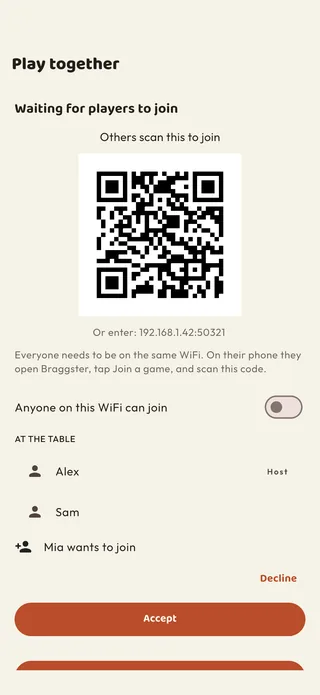
- The host opens a game that supports Play together and taps Play together, then Start a table. The host's phone shows a QR code and becomes the table.
- Everyone else joins on their own phone, on the same Wi-Fi: open Braggster, tap Scan a code and point the camera at the host's screen.
- Or pick it from the list. The table also appears under Tables on this Wi-Fi, so a player can tap it there instead of scanning.
- The host accepts. A scanned code lets a player straight in. Someone who picked the table from the list waits until the host taps Accept.
- Start the match. Once everyone is seated, the host starts, and each player plays their own seat on their own phone.
Which games you can play together
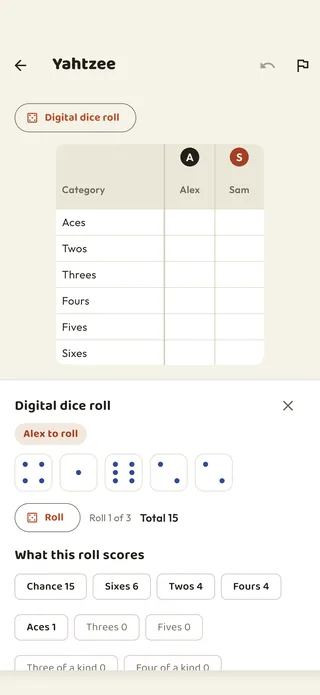
- Yahtzee, for up to six players. The host can switch on digital dice for the table: whoever's turn it is throws on their own phone, and everyone else watches the dice land on theirs. Each player fills in their own column. See the Yahtzee scoring guide.
- Chess, with every legal move enforced on both boards.
- Checkers and International draughts, including long capture sequences.
- Backgammon, with singles, gammons and backgammons scored as usual. See the Backgammon scoring guide.
- Othello, where every flip lands on both screens.
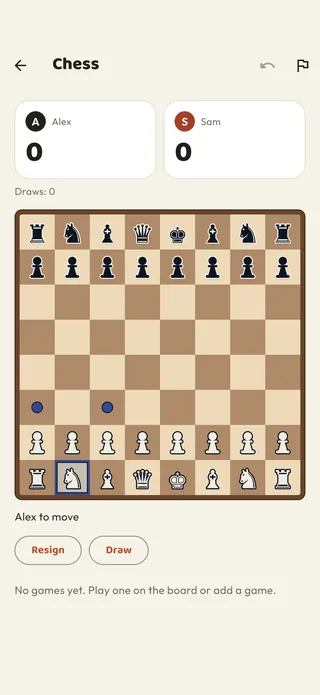
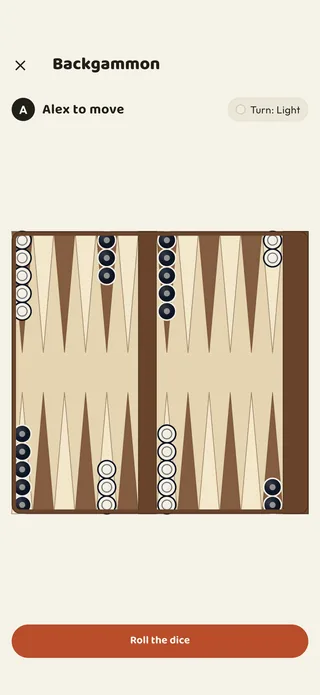
On the boards, the last move is marked on both phones, so you can see what your opponent just did the moment you look down. The full overview of the boards is in the board game guide, and the dice games are in the dice game guide.
iPhone and Android at one table
A table can mix iPhones and Android phones freely. Play together runs over Wi-Fi rather than Bluetooth, and that is exactly what lets the two kinds of phone meet.
Joining is free. Only the host needs the game: a player who joins does not have to own it or have any free plays left, so one person's phone never holds up the table.
Does it count in your statistics?
Yes. A Play together match is saved on every phone at the table and counts in each player's own statistics, win rate and streaks, just like a match played on one phone. Practice games against the computer are the exception: those never count, on any device.
When the table does not show up
Nearly every problem comes down to the phones not being able to see each other on the network.
- Allow the local network on iPhone. The first time you start or join a table, iOS asks whether Braggster may use the local network, "to host and join a shared scorecard with other players on the same WiFi". Tap Allow. If you declined, turn Local Network back on for Braggster in the iPhone's Settings.
- Scan the code instead of using the list. The list of tables relies on the phones finding each other automatically, and some networks quietly block that. The QR code carries the host's address, so scanning it connects directly. A player can also type the address shown under the code.
- Use your home Wi-Fi. Guest networks, and many hotel, office and school networks, keep devices apart from each other on purpose. When that happens nothing can connect, not even with the code, and the fix is to use an ordinary home Wi-Fi network.
- Check everyone is on the same network. A phone that has dropped back to mobile data, or joined a different Wi-Fi in the same house, will not find the table.
Frequently asked questions
Can two people play chess on two phones? Yes. With Play together, one phone starts a table and the other joins over the same Wi-Fi. Both players see the board live and each moves from their own phone.
Do we need an internet connection? No. The phones only need to be on the same Wi-Fi. Nothing goes over the internet and there is no account to create.
Can iPhone and Android play together? Yes. A table can mix iPhones and Android phones freely.
How many players can join a table? Yahtzee takes up to six players, a phone each. Chess, Checkers, International draughts, Backgammon and Othello are two-player games, so two phones.
Does everyone need to buy the game? No. Only the host needs the game. Joining a table is free.
Why can't my friend see the table? Check that both phones are on the same Wi-Fi and, on an iPhone, that Braggster may use the local network. If the table still does not appear, scan the host's code. On a guest or hotel network the phones may be kept apart entirely, so switch to a home Wi-Fi.
More: see Play together for the short version, or browse every game at braggster.com/games.
Yahtzee and Othello are the trademarks of their respective owners. Braggster is not affiliated with or endorsed by them and each name is used referentially only.